Welcome
The illustrations in the provided Wiki pages are for consultation purpose only and may not always reflect the latest implementation.
By default, notifications are sent to the project contacts of the beneficiary organisation/consortium coordinator as indicated in the National Agency Project Management system.
The person who receives notifications can be changed in your project by indicating another contact from the beneficiary organisation to have view or edit rights to the project. Notifications are, by default, sent in English, but may also be sent out in the language of the National Agency if the platform has been translated into that language. Some notifications are also sent to partners or co-beneficiary contacts with view or edit rights in a project.
Participants in mobility activity or solidarity projects also receive automatic e-mail notifications in relation to the project they are involved in.
Take note
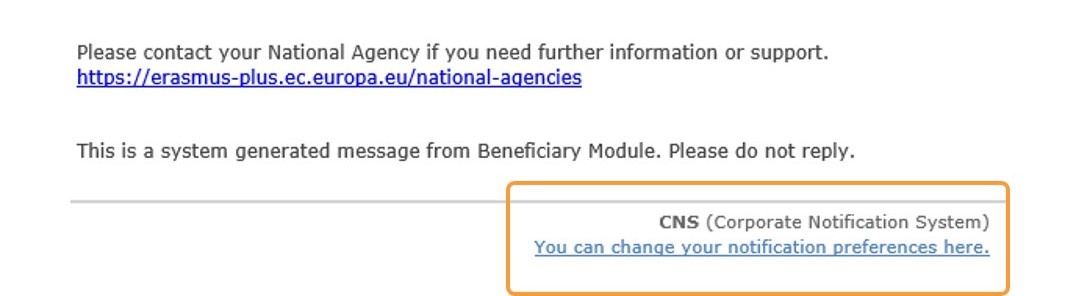
At the bottom of a notification email you will find the CNS link to change your notification preferences. Currently, the functionality offered via this link does not work. Do not use it.
The following recipients will receive automatic notifications:
|
|
Beneficiary (or Accreditation owner) |
Co-Beneficiary / Consortium member |
Consortium coordinator |
Partner (none of the previous) |
Participant (mobility) |
|---|---|---|---|---|---|
|
Privacy statement notification |
Yes | Yes | Yes | Yes | Yes |
|
Accreditation creation |
Yes | No | No | No | No |
|
Accreditation progress report request |
Yes | No | No | No | No |
|
Project creation |
Yes |
No |
Yes |
No |
No |
|
Project update |
Yes |
No |
No |
No |
No |
| Interim amendments exercise request | Yes | No | Yes | No | No |
| KA171 interim report request | Yes | No | Yes | No | No |
| KA171 periodic report request | Yes | No | No | No | No |
| KA171 interim report revision | Yes | No | Yes | No | No |
| KA171 periodic report revision | Yes | No | No | No | No |
| KA171 interim report cancelation | Yes | No | Yes | No | No |
| KA171 periodic report cancelation | Yes | No | No | No | No |
| KA210 and KA220 periodic report request | Yes | No | No | No | No |
| KA210 and KA220 progress report request | Yes | No | No | No | No |
| KA210 and KA220 periodic report reminder | Yes | No | No | No | No |
| KA210 and KA220 progress report reminder | Yes | No | No | No | No |
| KA210 and KA220 periodic report revision | Yes | No | No | No | No |
| KA210 and KA220 progress report revision | Yes | No | No | No | No |
| KA210 and KA220 periodic report cancelation | Yes | No | No | No | No |
| KA210 and KA220 progress report cancelation | Yes | No | No | No | No |
|
Final report rejection |
Yes |
No |
Yes |
No |
No |
|
Participant report request |
No |
No |
No |
No |
Yes |
|
Final report notification |
Yes |
No |
Yes |
No |
No |
|
Final report late submission reminder |
Yes |
No |
No |
No |
No |
A privacy statement notification is automatically sent to every email recorded in Beneficiary module with an explanation and a link to the Erasmus+/European Solidarity Corps privacy statement.
This notification is sent to the Beneficiary (or Accreditation owner), Co-Beneficiary/Consortium member, Consortium coordinator, Partner and/or Participant (mobility) in a project.
Subject: Erasmus+ and European Solidarity Corps programme privacy statement
Email body text:
Dear programme participant,
You are receiving this email because you participate in either Erasmus+ or European Solidarity Corps programme. The Erasmus+ programme covers mobilities in the areas of education and training as well as in youth.
Your personal data was entered into the European Commission’s IT system to allow your participation in one of the programme’s activities. The data was entered by the organisation managing the activity.
We want to draw your attention to our privacy statement. This document explains why we process your personal data, how long we process it, and who can access it. If you are interested in knowing more, you can find all information on the privacy statement page: https://ec.europa.eu/erasmus-esc-personal-data
Be welcome to address your questions by sending an email to eu-erasmus-esc-personal-data@ec.europa.eu.
Regards,
Directorate-General for Education, Youth, Sport and Culture
Unit B4: Erasmus+ Coordination
European Commission
Brussels, BelgiumThis email was sent from an unmonitored mailbox. Please do not reply.
When an Accreditation becomes available in Beneficiary module, a notification is sent to the Accreditation owner contact(s) with edit rights that are not the Legal representative.
Here is an example of the e-mail notification sent when a KA120 - Erasmus accreditation becomes available in Beneficiary module. For details regarding these accreditations in Beneficiary module, see the page KA120 Erasmus Accreditations in Beneficiary module.
Subject: Erasmus+ project management and reporting tool – Accreditation initiation – [Accreditation Code]
Email body text:
Dear [Contact FirstName] [Contact LastName],
Your accreditation is now available in the Erasmus+ project management and reporting tool.
Accreditation details:
Accreditation code: [Accreditation Code]
Accreditation type: [Possible values: Accreditation for a mobility consortium coordinator; Accreditation for an individual organisation]
Field: [Possible values: School education; Vocational education and training; Adult education]
Accredited organisation: [Beneficiary Legal Name]
Erasmus+ project management and reporting tool is the system for the management of accreditations and projects that received an EU grant under the Erasmus+ programme. The tool is developed by the European Commission for you, as beneficiaries of these projects.
In the Erasmus+ project management and reporting tool you will be able to see up-to-date information about your accreditations. You will also need to use this tool to submit accreditation progress reports to your National Agency. You will be notified when such a report is launched.
To access the Erasmus+ project management and reporting tool please follow this link: https://webgate.ec.europa.eu/beneficiary-module/project/#/project-list
To log in, you will need an EU Login (formerly called ECAS account) associated with this e-mail address. If you do not have an EU Login account associated with this e-mail address yet, please click on "Create an account" and set up your account. During the registration process, please make sure to use the e-mail address that this message was sent to.
You can find technical guidance for using the Erasmus+ project management and reporting tool here: https://wikis.ec.europa.eu/x/KKT-AQ
Please contact your National Agency if you need further information or support. You can find a list of National Agencies at the following link: https://erasmus-plus.ec.europa.eu/national-agencies
This is an automatically generated message from the Erasmus+ project management and reporting tool. Please do not reply.
Here is an example of the e-mail notification sent when a KA150 - Erasmus Accreditation for Youth becomes available in Beneficiary module. For details regarding these accreditations in Beneficiary module, see the page KA150 Erasmus Accreditation for Youth in Beneficiary module.
Subject: Erasmus+ project management and reporting tool – access to your accreditation space: [Accreditation Code]
Email body text:
Dear [Contact FirstName] [Contact LastName],
Your organisation’s accreditation space is now available in the Erasmus+ project management and reporting tool.
Accreditation details:
Accreditation code: [Accreditation Code]
Beneficiary organisation: [Beneficiary Legal Name]
The Erasmus+ project management and reporting tool is the system developed by the European Commission for the management of projects under the Erasmus+ programme.
For accredited organisations, the Erasmus+ project management and reporting tool will be used for submission of accreditation progress reports and Activity Plan updates to your National Agency. These exercises will be launched according to the schedule established by your National Agency.
To access the Erasmus+ project management and reporting tool please follow this link: https://webgate.ec.europa.eu/beneficiary-module/project/#/project-list
To log in, you will need an EU Login (formerly called ECAS account) associated with this e-mail address. If you do not have an EU Login account associated with this e-mail address yet, please click on "Create an account" to set one up. During the registration process, please make sure to use the same e-mail address where you have received this message.
You can find technical guidance for using the Erasmus+ project management and reporting tool here: https://wikis.ec.europa.eu/x/KKT-AQ
Please contact your National Agency if you need further information or support. You can find a list of Erasmus+ National Agencies at the following link: https://erasmus-plus.ec.europa.eu/national-agencies
This is an automatically generated message from the Erasmus+ project management and reporting tool. Please do not reply.
When the National Agency requests an Accreditation Progress Report from the accredited beneficiary organisation, an email is sent to the contact(s) of the accredited organisation with edit rights in Beneficiary module that are not legal representatives.
Here is an example of the Accreditation Progress Report request notification sent for KA120 Erasmus accreditations.
Subject: Erasmus+ project management and reporting tool – Accreditation progress report expected – [Accreditation Code]
Email body text:
Dear [Contact FirstName] [Contact LastName],
A new accreditation progress report has been launched by your National Agency with submission deadline on [Submission Deadline].
Accreditation details:
Accreditation code: [Accreditation Code]
Accreditation type: [Possible values: Accreditation for a mobility consortium coordinator; Accreditation for an individual organisation]
Field: [Possible values: School education; Vocational education and training; Adult education]
Accredited organisation: [Beneficiary Legal Name]
To access the Erasmus+ project management and reporting tool please follow this link: https://webgate.ec.europa.eu/beneficiary-module/project/#/project-list
To log in, you will need an EU Login (formerly called ECAS account) associated with this e-mail address. If you do not have an EU Login account associated with this e-mail address yet, please click on "Create an account" and set up your account. During the registration process, please make sure to use the e-mail address that this message was sent to.
You can find technical guidance for using the Erasmus+ project management and reporting tool here: https://wikis.ec.europa.eu/x/KKT-AQ
Please contact your National Agency if you need further information or support. You can find a list of National Agencies at the following link: https://erasmus-plus.ec.europa.eu/national-agencies
This is an automatically generated message from the Erasmus+ project management and reporting tool. Please do not reply.
Here is an example of the Accreditation Progress Report request notification sent for KA150 Erasmus accreditations.
Subject: Erasmus+ project management and reporting tool – Accreditation progress report expected – [Accreditation Code]
Email body text:
Dear [Contact FirstName] [Contact LastName],
A new accreditation progress report has been launched by your National Agency with submission deadline on [Submission Deadline].
Accreditation details:
Accreditation code: [Accreditation Code]
Accredited organisation: [Beneficiary Legal Name]
To access the Erasmus+ project management and reporting tool please follow this link: https://webgate.ec.europa.eu/beneficiary-module/project/#/project-list
To log in, you will need an EU Login (formerly called ECAS account) associated with this e-mail address. If you do not have an EU Login account associated with this e-mail address yet, please click on "Create an account" and set up your account. During the registration process, please make sure to use the e-mail address that this message was sent to.
You can find technical guidance for using the Erasmus+ project management and reporting tool here: https://wikis.ec.europa.eu/x/KKT-AQ
Please contact your National Agency if you need further information or support. You can find a list of National Agencies at the following link: https://erasmus-plus.ec.europa.eu/national-agencies
This is an automatically generated message from the Erasmus+ project management and reporting tool. Please do not reply.
When a project becomes available for its beneficiaries, a notification is sent to the project contact person(s) with edit rights of the beneficiary organisation. The legal representatives will not be notified.
The e-mail notification provides basic information on the project and instructions on how to sign in using EU Login and access the project. If you do not have an EU Login (previously ECAS account), follow the instructions to register first.
Here is an example of the e-mail notification sent:
Subject: Erasmus+ project initiation in the Beneficiary Module ([Project Code])
Email body text:
Dear [Contact FirstName] [Contact LastName],
Your Erasmus+ project is now available in Beneficiary module - the Erasmus+ project management and reporting tool.
Project details:
Project code: [Project Code]
National Project ID: [National ID][Do not show this line is there is no National ID]
Project title: [Project Title][Do not show this line is there is no project title]
Beneficiary organisation: [Beneficiary Legal Name]
Beneficiary Module is the European Commission’s system for management of projects that received an EU grant under the Erasmus+ programme.
In line with your project grant agreement, you must use the Beneficiary Module to regularly introduce information about the activities you have implemented and to submit project reports to your National Agency when requested. The tool will enable you to calculate the eligible grant corresponding to each activity and to monitor the progress of your project.
You can access the Beneficiary Module by following this link: https://webgate.ec.europa.eu/beneficiary-module/project/#/project-list
To log in, you will need an EU Login associated with the e-mail address where you have received this notification. If you do not have an EU Login account associated with this e-mail address yet, please follow the link above and click on "Create an account".
You can find technical guidance for using the Beneficiary Module here: https://wikis.ec.europa.eu/x/KKT-AQ
If you need further information or support, you can contact your National Agency. The list of National Agencies is available at the following link: https://erasmus-plus.ec.europa.eu/national-agencies
This is an automatically generated message from the Beneficiary Module – the Erasmus+ project management and reporting tool. Please do not reply.
When project data is updated by the participating organisations, an e-mail is sent to the beneficiary organisation contact(s) with edit rights in the project, with a summary of the update. The legal representatives are not notified. The project contact is referred to as the Primary contact in the project and can be changed to another contact person of the beneficiary organisation, if required.
Here is an example of the e-mail notification:
Subject: Erasmus+ project management and reporting tool - Project update [Project Agreement Number ] – [Project Title]
Email body text:
Dear [Contact FirstName] [Contact LastName],
Your project has been updated in Erasmus+ project management and reporting tool with new information on [dd/mm/yyyy] [hh:mm:ss]
Project details:
EC Project Number: [Project Agreement Number]
National Project ID: [National ID]
Project title: [Project Title]
Organisation Legal Name: [Beneficiary Legal Name]
Updated sections:
[if project details were updated]
Project details
[if project budget was updated]
Awarded budget
[if organisations were affected]
Organisations:
[if organisations were added, display list of organisations]
[OID], [Organisation ID], [Role], [Legal name] added
[if organisations were removed, display list of organisations]
[OID], [Organisation ID], [Role], [Legal name] removed
[if organisations were updated, display list of organisations]
[OID], [Organisation ID], [Role], [Legal name] updated
[if contact persons were affected]
Contact persons:
[if contact persons were added, display list of contact persons]
[Organisation OID], [Organisation legal name], [Organisation role], [First name], [Last name] added
[if contact persons were removed display list of contact persons]
[Organisation OID], [Organisation legal name], [Organisation role], [First name], [Last name] removed
[if contact persons were updated, display list of contact persons]
[Organisation OID], [Organisation legal name], [Organisation role], [First name], [Last name] updated
Be aware that the changes appear in the Erasmus+ project management and reporting tool for information only. It is your responsibility to adapt the project information in accordance with these changes, if necessary.
Please contact your National Agency if you need further information or support.
https://erasmus-plus.ec.europa.eu/national-agencies
This is a system generated message from Erasmus+ project management and reporting tool. Please do not reply.
An email is automatically sent to the primary contact of beneficiaries at the start of the exercise.
Please see an example of the e-mail notification below:
Subject: Interim amendment exercise for accredited mobility project [Project Code]
Email Body Text:
Dear [Contact FirstName] [Contact LastName],
This an automatically generated notification from the Erasmus+ project management and reporting tool to inform you about the start of the interim amendment exercise for accredited mobility projects under call [Call year].
According to the rules of Erasmus+ accredited mobility projects, you are able to make specific amendment requests after 12 months of implementation. These requests are made as part of the interim amendment exercise that has now been launched. You can submit your requests through the Erasmus+ project management and reporting tool (accessible at https://webgate.ec.europa.eu/beneficiary-module/project/#/project-list).
Participating in the interim exercise is entirely optional. If you do not wish to make any changes to your grant agreement, you do not need to do anything at this stage.
This is an automatically generated message from the Erasmus+ project management and reporting tool. Please do not reply.
A notification is sent to the project's beneficiary contact when the National Agency requests an Interim report for a KA171-HED - Mobility of higher education students and staff supported by external policy funds project. See How to complete and submit a KA171 Interim or Periodic Report for details.
Here is an example of the e-mail notification:
Subject: Interim report is requested for [Project Code] with submission deadline on [submission deadline]
Email body text:
Dear [Contact FirstName] [Contact LastName],
This is an automatically generated notification from the Erasmus+ project management and reporting tool to inform you that the Interim report is requested for your mobility project under call [Call year] with duration [24/36 months]. The deadline to submit your Interim Report is on [submission deadline].
According to the rules of Erasmus+ KA171 mobility projects, you can request your next pre-financing and make specific amendment requests after 12 months of implementation. These requests are made as part of the interim report exercise that has now been launched. You can submit your requests through the Erasmus+ project management and reporting tool (accessible at https://webgate.ec.europa.eu/beneficiary-module/project/#/project-list).
Participating in the interim exercise is mandatory. If you do not wish to make any changes to your grant agreement, the interim report serves the purpose of a progress report.
This is an automatically generated message. Please do not reply.
A notification is sent to the project's beneficiary contact when the National Agency requests the revision of a submitted Interim report for a KA171-HED - Mobility of higher education students and staff supported by external policy funds project. See How to complete and submit a KA171 Interim or Periodic Report for details.
Here is an example of the e-mail notification:
Subject: Interim Report has to be revised for [Project Code]
Email body text:
Dear [Contact FirstName] [Contact LastName],
This is an automatically generated notification from the Erasmus+ project management and reporting tool to inform you that the Interim report needs to be revised for your mobility project under call [Call year] with duration [24/36 months].
Participating in the interim exercise is mandatory. If you do not wish to make any changes to your grant agreement, the interim report serves the purpose of a progress report.This is an automatically generated message. Please do not reply.
A notification is sent to the project's beneficiary contact when the National Agency cancels the request for an Interim report. See How to complete and submit a KA171 Interim or Periodic Report for details.
Here is an example of the e-mail notification:
Subject: Interim Report has been cancelled for [Project Code]
Email body text:
Dear [Contact FirstName] [Contact LastName],
This is an automatically generated notification from the Erasmus+ project management and reporting tool to inform you that the Interim report has been cancelled for your mobility project under call [Call year] with duration [24/36 months].This is an automatically generated message. Please do not reply.
A notification is sent to the project's beneficiary contact when the National Agency requests a Periodic report for a KA171 project.
Here is an example of the e-mail notification:
Subject: Periodic report is requested for [Project Code] with submission deadline on [submission deadline]
Email Body Text:
Dear [Contact FirstName] [Contact LastName],
This is an automatically generated notification from the Erasmus+ project management and reporting tool to inform you that the Periodic report is requested for your mobility project under call [Call year] with duration [24/36 months]. The deadline to submit your Periodic Report is on [submission deadline].
According to the rules of Erasmus+ KA171 mobility projects, you can request your next pre-financing and make specific amendment requests after 12 months of implementation. These requests are made as part of the periodic report exercise that has now been launched. You can submit your requests through the Erasmus+ project management and reporting tool (accessible at https://webgate.ec.europa.eu/beneficiary-module/project/#/project-list).
Participating in the periodic exercise is mandatory. If you do not wish to make any changes to your grant agreement, the periodic report serves the purpose of a progress report.This is an automatically generated message. Please do not reply.
A notification is sent to the project's beneficiary contact when the National Agency requests a revision of the Periodic report for a KA171 project.
Here is an example of the e-mail notification:
Subject: Periodic Report has to be revised for [Project Code]
Email Body Text:
Dear [Contact FirstName] [Contact LastName],
This is an automatically generated notification from the Erasmus+ project management and reporting tool to inform you that the Periodic report needs to be revised for your mobility project under call [Call year] with duration [24/36 months].
Participating in the periodic exercise is mandatory. If you do not wish to make any changes to your grant agreement, the periodic report serves the purpose of a progress report.This is an automatically generated message. Please do not reply.
A notification is sent to the project's beneficiary contact when the National Agency cancels the Periodic report for a KA171 project.
Here is an example of the e-mail notification:
Subject: Periodic Report has been cancelled for [Project Code]
Email Body Text:Dear [Contact FirstName] [Contact LastName],
This is an automatically generated notification from the Erasmus+ project management and reporting tool to inform you that the Periodic report has been cancelled for your mobility project under call [Call year] with duration [24/36 months].This is an automatically generated message. Please do not reply.
A notification is sent to the project's beneficiary contact when the National Agency requests a Periodic report for a KA210 or KA220 project.
Here is an example of the e-mail notification:
Subject: Periodic report is requested for [Project Code]
Email body text:
Dear [Contact FirstName] [Contact LastName],
This is an automatically generated notification from the Erasmus+ project management and reporting tool to inform you that a Periodic report is requested for your project.
According to the reporting and payment schedule sets in the grant agreement (see section 4.2 of the Data sheet), you have to submit a/the Periodic report in 10 days. You can do that through the Erasmus+ project management and reporting tool (accessible at https://webgate.ec.europa.eu/beneficiary-module/project/#/project-list). Submitting this report will allow you to request additional pre-financing.This is an automatically generated message. Please do not reply.
A notification is sent to the project's beneficiary contact when the National Agency requests a Progress report for a KA210 or KA220 project.
Here is an example of the e-mail notification:
Subject: Progress report is requested for [Project Code]
Email body text:
Dear [Contact FirstName] [Contact LastName],
This is an automatically generated notification from the Erasmus+ project management and reporting tool to inform you that a Progress report is requested for your project.
According to the reporting and payment schedule sets in the grant agreement (see section 4.2 of the Data sheet), you have to submit a/the Periodic report in 10 days. You can submit your periodic report through the Erasmus+ project management and reporting tool (accessible at https://webgate.ec.europa.eu/beneficiary-module/project/#/project-list).
This is an automatically generated message. Please do not reply.
A notification is sent to the project's beneficiary contact when the National Agency requests the revision of a submitted Periodic report for a KA210 or KA220 project.
Here is an example of the e-mail notification:
Subject: Periodic report is requested for [Project Code]
Email body text:
Dear [Contact FirstName] [Contact LastName],
This is an automatically generated notification from the Erasmus+ project management and reporting tool to inform you that a Periodic report is requested for your project.
On [date of submission], you have submitted a periodic report. This report is not complete and we cannot evaluate it. We ask that you review the report and resubmit it within 15 days.
This is an automatically generated message. Please do not reply.
A notification is sent to the project's beneficiary contact when the National Agency requests the revision of a submitted Progress report for a KA210 or KA220 project.
Here is an example of the e-mail notification:
Subject: Progress report is requested for [Project Code]
Email body text:
Dear [Contact FirstName] [Contact LastName],
This is an automatically generated notification from the Erasmus+ project management and reporting tool to inform you that a Progress report is requested for your project.
On [date of submission], you have submitted a progress report. This report is not complete and we cannot evaluate it. We ask that you review the report and resubmit it within 15 days.
This is an automatically generated message. Please do not reply.
A reminder notification is sent to the project's beneficiary contact, indicating the deadline for the submission of a Periodic progress report in KA210 and KA220 projects.
Here is an example of the e-mail notification:
Subject: Periodic report is requested for [Project Code]
Email body text:
Dear [Contact FirstName] [Contact LastName],
This is an automatically generated notification from the Erasmus+ project management and reporting tool to inform you that a Periodic report is requested for your project.
According to the reporting and payment schedule sets in the grant agreement (see section 4.2 of the Data sheet), you had to submit a/the Periodic report by [submission deadline]. To date, this report has not been submitted. Please submit the periodic report urgently.In case you have any questions, please contact your National Agency.
This is an automatically generated message. Please do not reply.
A reminder notification is sent to the project's beneficiary contact, indicating the deadline for the submission of a Progress report in KA210 and KA220 projects.
Here is an example of the e-mail notification:
Subject: Progress report is requested for [Project Code]
Email body text:
Dear [Contact FirstName] [Contact LastName],
This is an automatically generated notification from the Erasmus+ project management and reporting tool to inform you that a Progress report is requested for your project.
According to the reporting and payment schedule sets in the grant agreement (see section 4.2 of the Data sheet), you had to submit a/the Periodic report by [submission deadline]. To date, this report has not been submitted. Please submit the periodic report urgently.This is an automatically generated message. Please do not reply.
A notification is sent to the project's beneficiary contact when the National Agency cancels the request for a Periodic report for KA210 and KA220 projects.
Here is an example of the e-mail notification:
Subject: Periodic report is cancelled for [Project Code]
Email body text:Dear [Contact FirstName] [Contact LastName],
This is an automatically generated notification from the Erasmus+ project management and reporting tool to inform you that a Periodic report is requested for your project.
According to the reporting and payment schedule sets in the grant agreement (see section 4.2 of the Data sheet), you have to submit a/the Periodic report. This was confirmed in an automatic email sent on [report request date]. The National Agency has decided to cancel this obligation. Therefore, you do not have to submit the periodic report anymore.
This is an automatically generated message. Please do not reply.
A notification is sent to the project's beneficiary contact when the National Agency cancels the request for a Progress report for KA210 and KA220 projects.
Here is an example of the e-mail notification:
Subject: Progress report is cancelled for [Project Code]
Email Body Text:
Dear [Contact FirstName] [Contact LastName],
This is an automatically generated notification from the Erasmus+ project management and reporting tool to inform you that a Progress report is requested for your project.
According to the reporting and payment schedule sets in the grant agreement (see section 4.2 of the Data sheet), you have to submit Progress report. This was confirmed in an automatic email sent on [report request date]. The National Agency has decided to cancel this obligation. Therefore, you do not have to submit the progress report anymore.
This is an automatically generated message. Please do not reply.
Reminders to provide the final report will be sent on the end date of the project, and one week before the Final report submission deadline. This notification is sent to the beneficiary organisation contact(s) with edit rights in the project that are not the legal representative. If the final report was already submitted before the configured dates, no notification is sent out. For details regarding the Final beneficiary report in Beneficiary module, please see the page Manage the final beneficiary report.
Here is an example of the e-mail notification:
Subject: Erasmus+ project management and reporting tool – Final Report Expected [Project Agreement Number ] – [Project Title]
Email body text:
Dear [Contact FirstName] [Contact LastName],
Your final report is expected till [Final Report Submission Deadline] by your National Agency. Please fill in the necessary data and submit your report.
Documentation for final beneficiary report submission can be found at https://wikis.ec.europa.eu/x/IIRYAg
Project details:
EC Project Number: [Project Agreement Number]
National Project ID: [National ID] (if applicable)
Project Title: [Project Title]
Project Acronym: [Project Acronym]
Project Start Date: [Project Start Date]
Project End Date: [Project End Date]
Organisation Legal Name: [Beneficiary Legal Name]
Organisation OID: [Organisation OID]
Please contact your National Agency if you need further information or support.
https://erasmus-plus.ec.europa.eu/national-agencies
This is a system generated message from Erasmus+ project management and reporting tool. Please do not reply.
Reminders to provide the final report will be sent on the end date of the project, and 53 days after the end date of the project. This notification is sent to the beneficiary organisation contact(s) with edit rights in the project that are not the legal representative. If the final report was already submitted before the configured dates, no notification is sent out. For details regarding the Final beneficiary report in Beneficiary module, please see the page Manage the final beneficiary report.
Subject: Erasmus+ project management and reporting tool – Late Final Report [Project Agreement Number ] – [Project Title]
Email Body Text:
Dear [Contact FirstName] [Contact LastName],
Your final report was expected till [Final Report Submission Deadline] by your National Agency. Please fill in the necessary data and submit your report.
Documentation for final beneficiary report submission can be found at https://wikis.ec.europa.eu/x/IIRYAg
Project details:
EC Project Number: [Project Agreement Number]
National Project ID: [National ID]
Project Title: [Project Title]
Project Acronym: [Project Acronym]
Project Start Date: [Project Start Date]
Project End Date: [Project End Date]
Organisation Legal Name: [Beneficiary Legal Name]
Organisation OID: [Organisation OID]
Please contact your National Agency if you need further information or support.
https://erasmus-plus.ec.europa.eu/national-agencies
This is a system generated message from Erasmus+ project management and reporting tool. Please do not reply.
In the case where the Final Report is rejected by the National Agency, an e-mail notification is sent to the project contact person of the beneficiary organisation.
Here is an example of the e-mail notification:
Subject: Erasmus+ project management and reporting tool – Final Report Rejected [Project Agreement Number ] – [Project Title]
Email body text:
Dear [Contact FirstName] [Contact LastName],
Your final report has been rejected by your National Agency. You have now full access to your project. Your National Agency will contact you to guide you in making the necessary corrections before you submit your report again. Please wait for their instructions.
Project details:
EC Project Number: [Project Agreement Number]
National Project ID: [National ID]
Project title: [Project Title]
Organisation Legal Name: [Beneficiary Legal Name]
Please contact your National Agency if you need further information or support.
https://erasmus-plus.ec.europa.eu/national-agencies
This is a system generated message from Erasmus+ project management and reporting tool. Please do not reply.
Automatic e-mails are sent to participants with an invitation to complete a Participant Report in EU Survey, to share their feedback on the experience participating in an activity for Erasmus+. All participants will receive this notification, except those taking part in Youth and Higher Education International projects.
For details on the Participant Report in Beneficiary module, see the page Manage participant reports in projects.
Subject: Erasmus+ participant report
Email Body Text:Dear %%FIRST_NAME%% %%LAST_NAME%%
You recently took part in an Erasmus+ project. Now it's time to tell us what you think! It takes just 5-10 minutes to fill in your "participant report". This is a required part of your mobility activity placement, and your feedback is very valuable. Your sending organisation, the National Agencies and the European Commission use your answers to improve Erasmus+ for future participants.You should submit the report any time in the next 30 days. Click here to start: %%UNIQUE_ACCESS_LINK%%
Please note that this report is intended to be submitted only by you and you may not forward the above link to any other recipient.
You may save a temporary draft and use the same hyperlink to get back to it. Once completed, you should submit the report by clicking on the "Submit" button. Be aware that you will no longer be able to change it.To help you fill in your report, please find below your main mobility activity details:
Mobility activity type: %%ACTIVITY_TYPE%%
Planned dates of mobility activity: %%START_DATE%% - %%END_DATE%%
Country of mobility activity: %%LOCATION_COUNTRY%%
Sending organisation:
Name: %%HOME_NAME%%
City: %%HOME_CITY%%
Country %%HOME_COUNTRY%%
Receiving organisation:
Name: %%HOST_NAME%%
City: %%HOST_CITY%%
Country %%HOST_COUNTRY%%Should you wish to report on any sensitive issue which you do not want to disclose in this report, you may want to contact the sending organisation or National Agency that has selected your project. In case any of the information presented above is not correct, please also contact your National Agency.
Contact details of Erasmus+ National Agencies can be found at %%NA_INFORMATION%%Your personal data is protected. If you have questions regarding data protection, please have a look at: %%PERSONAL_DATA_PROTECTION%%
Many thanks for your time and for helping make the Erasmus+ programme better!
The Erasmus+ Programme TeamThis is a system generated message from EU Survey. Please do not reply. If you encounter any difficulties in filling the report, please contact your beneficiary organisation: %%HOME_NAME%%
Subject: Erasmus+ participant report
Email body text:
Dear %%FIRST_NAME%% %%LAST_NAME%%
You recently took part in an Erasmus+ project. Now it's time to tell us what you think by filling in your participant report that takes the form of a short online report. Your feedback is very valuable to the European Commission, the National Agencies and individual organisations involved in the project, and will help improve the Erasmus+ programme for future generations!
You should submit the report any time in the next 30 days. Click here to start: %%UNIQUE_ACCESS_LINK%%
You may save a temporary draft and use the same hyperlink to get back to it. Once completed, you should submit the report by clicking on the "Submit" button. Be aware that you will no longer be able to change it.
To help you fill in your report, please find below your main mobility activity details:
Mobility activity type: %%ACTIVITY_TYPE%%
Planned dates of mobility activity: %%START_DATE%% - %%END_DATE%%
Country of mobility activity: %%HOST_COUNTRY%%
Sending organisation:
Name: %%HOME_NAME%%
City: %%HOME_CITY%%
Country %%HOME_COUNTRY%%
Receiving organisation:
Name: %%HOST_NAME%%
City: %%HOST_CITY%%
Country %%HOST_COUNTRY%%
Should you wish to report on any sensitive issue which you do not want to disclose in this report, you may want to contact the sending organisation or National Agency that has selected your project. In case any of the information presented above is not correct, please also contact your National Agency.
Contact details of Erasmus+ National Agencies can be found at %%NA_INFORMATION%%Your personal data is protected. If you have questions regarding data protection, please have a look at: %%PERSONAL_DATA_PROTECTION%%
Many thanks for your time and for helping make the Erasmus+ programme better!
The Erasmus+ Programme Team
This is a system generated message from EU Survey. Please do not reply. If you encounter any difficulties in filling the report, please contact your beneficiary organisation: %%HOME_NAME%%
Subject: Erasmus+ participant report
Email body text:
Dear %%FIRST_NAME%% %%LAST_NAME%%,
You recently took part in an Erasmus+ project. Now it's time to tell us what you think! It takes just 5-10 minutes to fill in your "participant report". This is a required part of your mobility activity placement, and your feedback is very valuable. Your sending organisation, the National Agencies and the European Commission use your answers to improve Erasmus+ for future participants.
You should submit the report within 10 calendar days upon receipt of this invitation. Click here to start: %%UNIQUE_ACCESS_LINK%%Please note that this report is intended to be submitted only by you and you may not forward the above link to any other recipient
You may save a temporary draft and use the same hyperlink to get back to it. Once completed, you should submit the report by clicking on the "Submit" button. Be aware that you will no longer be able to change it.To help you fill in your report, please find below your main mobility activity details:
Mobility activity type: %%ACTIVITY_TYPE%%
Planned dates of mobility activity: %%START_DATE%% - %%END_DATE%%
Country of mobility activity: %%LOCATION_COUNTRY%%
Sending organisation:
Name: %%HOME_NAME%%
City: %%HOME_CITY%%
Country %%HOME_COUNTRY%%
Receiving organisation:
Name: %%HOST_NAME%%
City: %%HOST_CITY%%
Country %%HOST_COUNTRY%%Should you wish to report on any sensitive issue which you do not want to disclose in this report, you may want to contact the sending organisation or National Agency that has selected your project. In case any of the information presented above is not correct, please also contact your National Agency.
Contact details of Erasmus+ National Agencies can be found at %%NA_INFORMATION%%Your personal data is protected. If you have questions regarding data protection, please have a look at: %%PERSONAL_DATA_PROTECTION%%
Many thanks for your time and for helping make the Erasmus+ programme better!
The Erasmus+ Programme TeamThis is a system generated message from EU Survey. Please do not reply. If you encounter any difficulties in filling the report, please contact your beneficiary organisation: %%BENEFICIARY_ORGANISATION_NAME%%
Subject: Erasmus+ participant report
Email Body Text:Dear %%FIRST_NAME%% %%LAST_NAME%%,
You recently took part in an Erasmus+ project. Now it's time to tell us what you think! It takes just 5-10 minutes to fill in your "participant report". This is a required part of your mobility activity placement, and your feedback is very valuable. Your sending organisation, the National Agencies and the European Commission use your answers to improve Erasmus+ for future participants.You should submit the report within 30 calendar days upon receipt of this invitation. Click here to start: %%UNIQUE_ACCESS_LINK%%
Please note that this report is intended to be submitted only by you and you may not forward the above link to any other recipient
You may save a temporary draft and use the same hyperlink to get back to it. Once completed, you should submit the report by clicking on the "Submit" button. Be aware that you will no longer be able to change it.To help you fill in your report, please find below your main mobility activity details:
Mobility activity type: %%ACTIVITY_TYPE%%
Planned dates of mobility activity: %%START_DATE%% - %%END_DATE%%
Country of mobility activity: %%LOCATION_COUNTRY%%
Sending organisation:
Name: %%HOME_NAME%%
City: %%HOME_CITY%%
Country %%HOME_COUNTRY%%
Receiving organisation:
Name: %%HOST_NAME%%
City: %%HOST_CITY%%
Country %%HOST_COUNTRY%%Should you wish to report on any sensitive issue which you do not want to disclose in this report, you may want to contact the sending organisation or National Agency that has selected your project. In case any of the information presented above is not correct, please also contact your National Agency.
Contact details of Erasmus+ National Agencies can be found at %%NA_INFORMATION%%Your personal data is protected. If you have questions regarding data protection, please have a look at: %%PERSONAL_DATA_PROTECTION%%
Many thanks for your time and for helping make the Erasmus+ programme better!
The Erasmus+ Programme TeamThis is a system generated message from EU Survey. Please do not reply. If you encounter any difficulties in filling the report, please contact your beneficiary organisation: %%BENEFICIARY_ORGANISATION_NAME%%
For details regarding the Report on recognition in Beneficiary module, see the page Manage Report On Recognition.
Subject: Erasmus+ participant report on recognition
Email body text:
Dear %%RECOGN.FIRST_NAME%% %%RECOGN.LAST_NAME%%,
You have taken part in an Erasmus+ mobility activity project and already submitted feedback on your mobility activity experience through the participant report. As your recognition process was not finalised at the time of the submission of your first report, you are now asked to fill in the second report which focuses specifically on recognition.Your mobility activity details were the following:
Mobility activity type: %%RECOGN.ACTIVITY_TYPE%%
Planned dates of mobility activity: %%RECOGN.START_DATE%% - %%RECOGN.END_DATE%%
Country of mobility activity: %%RECOGN.LOCATION_COUNTRY%%
Sending organisation:
Name: %%RECOGN.HOME_NAME%%
City: %%RECOGN.HOME_CITY%%
Country: %%RECOGN.HOME_COUNTRY%%
Receiving organisation:
Name: %%RECOGN.HOST_NAME%%
City: %%RECOGN.HOST_CITY%%
Country: %%RECOGN.HOST_COUNTRY%%
Please click on the link below to access the online participant report on recognition and fill it in: %%RECOGN.UNIQUE_ACCESS_LINK%%
You may save a temporary draft and use the same hyperlink to get back to it. Once you have completed it by answering all questions, please submit it by clicking on the "Submit" button. After having submitted the report you will no longer be able to change it.
This is a system generated message from EU Survey. Please do not reply. If you encounter any difficulties in filling the report please contact your beneficiary organisation: %%RECOGN.BENEFICIARY_ORGANISATION_NAME%%Should you wish to report on any sensitive issue which you do not want to disclose in this report, you may want to contact the National Agency that has selected your project. Contact details of Erasmus+ National Agencies can be found at %%RECOGN.NA_INFORMATION%%
Your personal data is protected. More details can be found at %%RECOGN.PERSONAL_DATA_PROTECTION%%
Many thanks for the time dedicated to this Erasmus+ participant report on recognition!
Reminder email sent for Final Report late submission
Reminders to provide the final report will be sent on the end date of the project and 53 days after the end date of the project.
Here is an example of the e-mail notification:
Subject: Erasmus+ project management and reporting tool – Late Final Report [Project Agreement Number ] – [Project Title]
Email Body Text:
Dear [Contact FirstName] [Contact LastName],
Your final report was expected till [Final Report Submission Deadline] by your National Agency. Please fill in the necessary data and submit your report.
Documentation for final beneficiary report submission can be found at https://wikis.ec.europa.eu/x/IIRYAg
Project details:EC Project Number: [Project Agreement Number]
National Project ID: [National ID]
Project Title: [Project Title]
Project Acronym: [Project Acronym]
Project Start Date: [Project Start Date]
Project End Date: [Project End Date]
Organisation Legal Name: [Beneficiary Legal Name]
Organisation OID: [Organisation OID]
Please contact your National Agency if you need further information or support.https://erasmus-plus.ec.europa.eu/national-agencies
This is a system generated message from Erasmus+ project management and reporting tool. Please do not reply.
The following recipients will receive automatic notifications:
|
|
Beneficiary Contact |
Partner |
Participant |
|---|---|---|---|
|
Email recorded in BM |
Yes | Yes | Yes |
|
Project creation |
Yes |
Yes |
No |
|
Project update |
Yes |
No |
No |
|
Beneficiary report rejection |
Yes |
No |
No |
|
Participant report request |
No |
No |
Yes |
|
Beneficiary report notification |
Yes |
No |
No |
|
Registration to the European Youth Card |
No | No | Yes |
|
Beneficiary report late submission reminder |
Yes | No | No |
A privacy statement notification email is automatically sent to the every email recorded in Beneficiary module with an explanation and a link to the Erasmus+/European Solidarity Corps privacy statement.
Subject: Privacy statement for European Solidarity Corps
Email body text:
Hello,
You are receiving this email because you participate in European Solidarity Corps programme.
Your personal data were entered into the European Commission’s IT system to allow your participation in one of the programme’s activities. The data were entered by the organisation managing the activity.
We want to draw your attention to our privacy statement. This document explains why we process your personal data, how long we process it, and who can access it. If you are interested in knowing more, you can find all information on the privacy statement page: https://ec.europa.eu/erasmus-esc-personal-data
Be welcome to address your questions by sending an email to eu-erasmus-esc-personal-data@ec.europa.eu.
Regards,
Directorate-General for Education, Youth, Sport and Culture
Unit B4: Erasmus+ Coordination
European Commission
Brussels, BelgiumThis email was sent from an unmonitored mailbox. Please do not reply.
When an ESC50/ESC52 Quality Label becomes for beneficiaries, a notification is sent to the Accreditation owner contact(s) with edit rights that are not the Legal representative.
Subject: Beneficiary module – access to your Quality Label space: [Quality Label Code]
Email body text:
Dear [Contact FirstName] [Contact LastName],
Your organisation’s Quality Label space is now available in the Beneficiary module.
Quality Label details:
Quality Label code: [QL Code]
Beneficiary organisation: [Beneficiary Legal Name]
The Beneficiary module is the system developed by the European Commission for the management of projects under the Erasmus+ and the European Solidarity Corps programmes.
For organisations holding a Quality Label, the Beneficiary module will be used for submission of progress reports and requests for Quality Label updates/changes to your National Agency. These exercises will be launched according to the schedule established by your National Agency.
To access the Beneficiary module please follow this link: https://webgate.ec.europa.eu/beneficiary-module/project/#/project-list
To log in, you will need an EU Login (formerly called ECAS account) associated with this e-mail address. If you do not have an EU Login account associated with this e-mail address yet, please click on "Create an account" to set one up. During the registration process, please make sure to use the same e-mail address where you have received this message.
You can find technical guidance for using the Beneficiary module here: https://wikis.ec.europa.eu/x/KKT-AQ
Please contact your National Agency if you need further information or support. You can find a list of Erasmus+ National Agencies at the following link: https://europa.eu/youth/solidarity/organisations/contact-national-agencies_en
This is an automatically generated message from the Beneficiary module. Please do not reply.
When the National Agency requests an Accreditation Progress Report from the beneficiary organisation awarded with the Quality Label, an email is sent to the contact(s) of the accredited organisation with edit rights in Beneficiary module that are not legal representatives.
Subject: European Solidarity Corps – Quality Label progress report expected – [Quality Label Code]
Email body text:
Dear [Contact FirstName] [Contact LastName],
A Quality Label progress report or update request has been launched by your National Agency with submission deadline on [Submission Deadline].
Quality Label details:
Quality Label code: [Quality Label Code]
Quality Label role: [Possible values: lead/support/host]
Quality Label organisation: [Beneficiary Legal Name]
The report must be submitted via the Beneficiary module. For access please follow this link: https://webgate.ec.europa.eu/beneficiary-module/project/#/project-list
To log in you will need an EU Login (formerly called ECAS account) associated with this e-mail address. If you do not have an EU Login account associated with this e-mail address yet, please click on "Create an account" and set up your account. During the registration process, please make sure to use the e-mail address that this message was sent to.
You can find technical guidance for using the Beneficiary module here: https://wikis.ec.europa.eu/x/KKT-AQ
Please contact your National Agency if you need further information or support. You can find a list of National Agencies at the following link: https://europa.eu/youth/solidarity/organisations/contact-national-agencies_en
This is an automatically generated message from the Beneficiary module. Please do not reply.
When a project becomes available for its beneficiaries, a notification will be sent to the project contact person of the beneficiary organisation. The legal representatives will not be notified.
The e-mail notification provides basic information on the project and instructions on how to sign in using EU Login and access the project. If you do not have an EU Login (previously ECAS account), follow the instructions to register first.
Here is an example of the e-mail notification:
Subject: European Solidarity Corps project initiation in Beneficiary Module ([Project Code])
Email Body Text:
Dear [Contact FirstName] [Contact LastName],
Your European Solidarity Corps project is now available in Beneficiary Module - the European Solidarity Corps project management and reporting tool.
Project details:
Project code: [Project Code]
National Project ID: [National ID][Do not show this line is there is no National ID]
Project title: [Project Title][Do not show this line is there is no project title]
Beneficiary organisation: [Beneficiary Legal Name]
Beneficiary Module is the European Commission’s system for management of projects that received an EU grant under the European Solidarity Corps programme.
In line with your project grant agreement, you must use the Beneficiary Module to regularly introduce information about the activities you have implemented and to submit project reports to your National Agency when requested. The tool will enable you to calculate the eligible grant corresponding to each activity and to monitor the progress of your project.
You can access the Beneficiary Module by following this link: https://webgate.ec.europa.eu/beneficiary-module/project/#/project-list
To log in, you will need an EU Login associated with the e-mail address where you have received this notification. If you do not have an EU Login account associated with this e-mail address yet, please follow the link above and click on "Create an account".
You can find technical guidance for using the Beneficiary Module here: https://wikis.ec.europa.eu/x/KKT-AQ
If you need further information or support, you can contact your National Agency. The list of National Agencies is available at the following link: https://europa.eu/youth/solidarity/organisations/contact-national-agencies_en
This is an automatically generated message from the Beneficiary Module. Please do not reply.
When project data is updated by the participating organisations, an e-mail is sent to the contact of the beneficiary organisation, providing a short summary of the update. The legal representatives are not notified. The project contact is referred to as the Primary contact in the project and can be changed to another contact person of the beneficiary organisation, if required.
Here is an example of the e-mail notification:
Subject: Beneficiary module - Project update [Project Agreement Number ] – [Project Title]
Email body text:
Dear [Contact FirstName] [Contact LastName],
Your project has been updated in Beneficiary module with new information on [dd/mm/yyyy] [hh:mm:ss]
Project details:
EC Project Number: [Project Agreement Number]
National Project ID: [National ID]
Project title: [Project Title]
Be aware that changes appear in the Beneficiary module for information only. It is your responsibility to adapt the project information in accordance with these changes, if necessary.
Please contact your National Agency if you need further information or support.
This is a system generated message by Beneficiary module. Please do not reply.
Reminders to provide the final report will be sent on the end date of the project and 53 days after the end date of the project. This 53 days is a default and your National Agency may adjust the timing and the content of the message to their needs.
Here is an example of the e-mail notification:
Subject: Beneficiary module – Final Report Expected [Project Agreement Number ] – [Project Title]
Email body text:
Dear [Contact FirstName] [Contact LastName],
Your final report is expected till [Final Report Submission Deadline] by your National Agency. Please fill in the necessary data and submit your report.
Documentation for final beneficiary report submission can be found at https://wikis.ec.europa.eu/x/IIRYAg
Project details:
EC Project Number: [Project Agreement Number]
National Project ID: [National ID]
Project Title: [Project Title]
Project Acronym: [Project Acronym]
Project Start Date: [Project Start Date]
Project End Date: [Project End Date]
Beneficiary Organisation information: [Organization information]
Organisation Legal Name: [Beneficiary Legal Name]
Organisation OID: [Organisation OID]
Project Information [Project information]
Documentation for final beneficiary report submission can be found at https://wikis.ec.europa.eu/x/IIRYAg.
Please contact your National Agency if you need further information or support. https://europa.eu/youth/solidarity/organisations/contact-national-agencies_en.
For additional help on how to manage your project in Beneficiary module please consult the Guide for Beneficiaries: https://wikis.ec.europa.eu/x/KKT-AQ
This is a system generated message from Beneficiary module. Please do not reply.
Reminders to provide the final report will be sent on the end date of the project and 53 days after the end date of the project.
Here is an example of the e-mail notification:
Subject: Beneficiary module – Final Report Expected [Project Agreement Number ] – [Project Title]
Email Body Text:
Dear [Contact FirstName] [Contact LastName],
Your final report was expected till [Final Report Submission Deadline] by your National Agency. Please fill in the necessary data and submit your report.Documentation for final beneficiary report submission can be found at https://wikis.ec.europa.eu/x/IIRYAg
Project details:EC Project Number: [Project Agreement Number]
National Project ID: [National ID]
Project Title: [Project Title]
Project Acronym: [Project Acronym]
Project Start Date: [Project Start Date]
Project End Date: [Project End Date]
Beneficiary Organisation information: [Organization information]
Organisation Legal Name: [Beneficiary Legal Name]
Organisation OID: [Organisation OID]
Project Information [Project information]
Documentation for final beneficiary report submission can be found at https://wikis.ec.europa.eu/x/IIRYAg.Please contact your National Agency if you need further information or support. https://europa.eu/youth/solidarity/organisations/contact-national-agencies_en.
For additional help on how to manage your project in Beneficiary module please consult the Guide for Beneficiaries: https://wikis.ec.europa.eu/x/KKT-AQ
This is a system generated message from Beneficiary module. Please do not reply.
In the case where the Final Report is rejected by the National Agency, an e-mail notification is sent to the project contact person of the beneficiary organisation.
Here is an example of the e-mail notification:
Subject: Beneficiary module – Final Report Rejected [Project Agreement Number ] – [Project Title]
Email Body Text:
Dear [Contact FirstName] [Contact LastName],
Your final report has been rejected by your National Agency. You have now full access to your project. Your National Agency will contact you to guide you in making the necessary corrections before you submit your report again. Please wait for their instructions.
Project details:
EC Project Number: [Project Agreement Number]
National Project ID: [National ID]
Project title: [Project Title]
Organisation Legal Name: [Beneficiary Legal Name]
Please contact your National Agency if you need further information or support.
https://europa.eu/youth/solidarity/organisations/contact-national-agencies_en
This is a system generated message from Beneficiary module. Please do not reply.
Automatic e-mails are sent to participants with an invitation to complete a Participant Report in EU Survey to share their feedback on the experience participating in an activity for European Solidarity Corps.
Subject: European Solidarity Corps participant report
Email body text:
Dear %%FIRST_NAME%% %%LAST_NAME%%
You recently took part in a European Solidarity Corps project. Now it's time to tell us what you think! It takes less than 10 minutes to fill in your "participant report". This is a required part of your activity, and your feedback is very valuable. Involved organisations, National Agencies and the European Commission use your answers to improve the European Solidarity Corps for future participants.
You should submit the report any time in the next 30 days. Click here to start: %%UNIQUE_ACCESS_LINK%%You may save a temporary draft and use the same hyperlink to get back to it. Once completed, you should submit the report by clicking on the "Submit" button. Be aware that you will no longer be able to change it.
To help you fill in your report, please find below your main activity details:
Activity type: %%ACT_TYPE%%
Planned dates of activity: %%ACT_START%% - %%ACT_END%%
Country of activity: %%ACT_COUNTRY%%
Supporting organisation:
Name: %%SUPP_ORG_LEG_NAME%%
Country: %%SUPP_ORG_COUNTRY%%
City: %%SUPP_ORG_CITY%%
Host organisation:
Name: %%HOST_ORG_LEG_NAME%%
Country: %%HOST_ORG_COUNTRY%%
City: %%HOST_ORG_CITY%%
Project Code: %%AGREE_NR%%
National Agency funding the project: %%NA%%Should you wish to report on any sensitive issue which you do not want to disclose in this report, you may want to contact the supporting organisation, if any, or the National Agency that has selected your project. In case any of the information presented above is not correct, please also contact your National Agency.
Contact details of European Solidarity Corps National Agencies can be found at %%ESCNATIONALAGENCIESURL%%Your personal data is protected. If you have questions regarding data protection, please have a look at the specific privacy statement: %%EACDPO%%
Many thanks for your time and for helping make the European Solidarity Corps better!
The European Solidarity Corps TeamThis is a system generated message from EU Survey. Please do not reply. If you encounter any difficulties in filling the report, please contact the beneficiary organisation.
Subject: European Solidarity Corps participant report
Email body text:
Dear %%FIRST_NAME%% %%LAST_NAME%%,
You recently took part in a European Solidarity Corps project. Now it's time to tell us what you think! It takes less than 10 minutes to fill in your "participant report". This is a required part of your project, and your feedback is very valuable. National Agencies and the European Commission use your answers to improve the European Solidarity Corps for future participants.
You should submit the report any time in the next 30 days. Click here to start: %%UNIQUE_ACCESS_LINK%%
You may save a temporary draft and use the same hyperlink to get back to it. Once completed, you should submit the report by clicking on the "Submit" button. Be aware that you will no longer be able to change it.
To help you fill in your report, please find below your main activity details:
Project Code: %%AGREE_NR%%
Project dates: %%PRJ_START_DATE%% - %%PRJ_END_DATE%%
Country of project: %%NA_COUNTRY%%
National Agency funding the project: %%NA%%Should you wish to report on any sensitive issue which you do not want to disclose in this report, you may want to contact the National Agency that has selected your project. In case any of the information presented above is not correct, please also contact your National Agency.
Contact details of European Solidarity Corps National Agencies can be found at %%ESCNATIONALAGENCIESURL%%Your personal data is protected. If you have questions regarding data protection, please have a look at the specific privacy statement: %%EACDPO%%
Many thanks for your time and for helping make the European Solidarity Corps better!
The European Solidarity Corps Team
This is a system generated message from EU Survey. Please do not reply. If you encounter any difficulties in filling the report, please contact the beneficiary organisation.
Participants in European Solidarity Corps will receive a notification email informing them that they can register for the European Youth Card in the website www.eyca.org.
Subject: Your European Solidarity Corps activity and the European Youth Card
Email body text:
Hi [Contact FirstName] [Contact LastName]!
Thank you for taking part in the European Solidarity Corps. As a European Solidarity Corps participant, you are entitled to a special edition of the European Youth Card.With your EYC, you will have access to a wide range of discounts and benefits across Europe [link: https://eyca.org/discounts], including reduced prices on transportation, accommodation and cultural activities.
How can I access my European Youth Card?
- Download the mobile app using the links below (or download the app called ‘European Solidarity Corps Youth Card’ in the App Store [link: https://apps.apple.com/us/app/european-solidarity-corps-yc/id1367410987] / Google Play [link: https://play.google.com/store/apps/details?id=eu.eycaapp.volunteer&hl=en&gl=US]).
- Then, create an account with your EYCA number: [EYCA token]
- As part of our effort to reduce our plastic footprint, all cards are accessible digitally through your smartphone and no plastic cards will be generated as part of this initiative.
Other questions you might have:
- Why am I receiving this? Because you are a European Solidarity Corps participant. As a token of gratitude, we offer this card to all participants.
- For how long will my EYC be valid? 18 months from the moment you receive this email or until you turn 31 years of age.
- How can I access the discounts? Use the EYCA number to access online discounts or show your digital card to the vendor for in-store discounts. Head to our website to see all our discounts [link: https://eyca.org/discounts].
- Who’s behind this initiative? The European Commission [link: https://commission.europa.eu/about-european-commission/departments-and-executive-agencies/education-youth-sport-and-culture_en] and the European Youth Card Association [link: https://eyca.org/] (EYCA) under the scope of the European Solidarity Corps programme [link: https://youth.europa.eu/solidarity_en].
If you have any other questions, you can visit our Frequently Asked Questions [link: https://eyca.org/faq] page. And if you need any further assistance, just send us an email at esc-participants@eyca.org [link: mailto:esc-participants@eyca.org]
We wish you a wonderful time as a European Youth Cardholder!
The European Youth Card Association
Contact
Legal Notice |Processing personal data | Cookies | Powered by Atlassian Confluence